The terminal challenge was suggested by alfred on the SDF.org bboard RETRO forum. He articulated something I was already stumbling toward. The challenge is to accomplish daily computing tasks using a text terminal with the command line and other text-based user interfaces (TUI) rather than the ubiquitous graphical user interface (GUI).
TACKER: alfred ()
SUBJECT: Terminal Challenge
DATE: 23-Jul-26 00:05:40
HOST: sdf
In the last several years, I feel I’ve completed two major personal computer challenges. The first was to replicate all the things I did on my Windows (7) PC to Linux Mint - and migrate to Linux by the time Win7 support ended in 2020.
The second was not time-constrained, and just done for fun and curiosity, as a follow-up: could I do the same replication on a Raspberry Pi? Granted, this was more intra-Linux, but it still was a bit of challenge.
I’m feeling the pull of a third challenge, one that probably can’t be 100% achieved, but still grabs my interest: to what degree can I replicate all that I do on my Linux Mint PC, in a TUI instead of a GUI?
Earlier Efforts
I first started moving back to the terminal when I bought a Raspberry Pi 4 in 2020 to help occupy my COVID lock down hours. It can run a full GUI Linux, albeit a bit sluggishly so I turned to the terminal for convenience. Last year I installed MX Linux on an old MacBook Pro and pushed my command line tasks further to include ripping CDs. Finally I replaced Raspberry Pi OS on my Pi 4 with FreeBSD this summer and have not installed any graphical environment at all.
Between my MX Linux and FreeBSD experiences I joined SDF.org◊ and added NetBSD to my collection. It is on SDF.org where I encountered alfred and his terminal challenge.
◊ Find details on how I joined SDF.org at: gemini://sdf.org/paulmccombs/gemlog/introduction-to-geminispace.gmi
◊ Paul’s Introduction to Geminispace
The Challenge Engaged
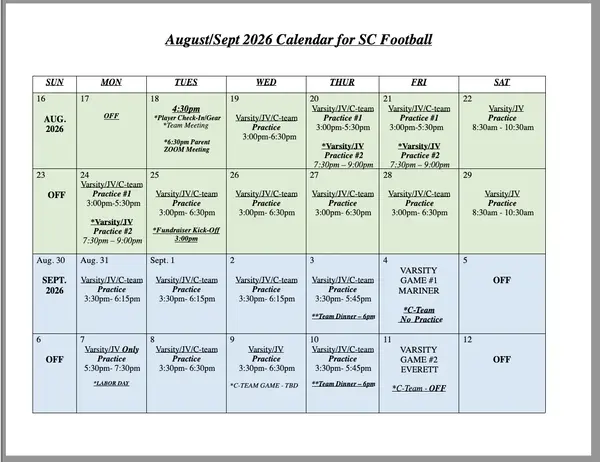
I quickly found the first task I undertook after reading about the challenge. I received my son’s football practice schedule as a Word .DOC file. Not a .DOCX file, which I could easily handled using Pandoc*, but an older format used by MS Word 97-2007. Too old for Pandoc. What I wanted to do was print it out to put up in our kitchen. Afterward, I shared my experience with the RETRO board.
TACKER: paulmccombs (Paul McCombs)
SUBJECT: Terminal Challenge - minor success print Word *.doc file
DATE: 17-Aug-26 22:01:17
HOST: faeroes
…
I have set up a circa 2004 Epson 24 pin dot matrix printer to use with my command-line only [computer] to enhance the retro feel. I have installed and configured CUPS (using elinks text mode web browser) to print to the Epson. CUPS is capable of processing a PDF file, among other formats.
…
I was able to learn that I could install LibreOffice§ and use it with the –headless switch to convert the doc file to PDF. This worked and I judged myself to have “won” that particular challenge. However the LibreOffice install was very large. ~1 GB of storage.
I got a larger response than I expected including five solid suggestions to investigate, and a further challenge to view the .DOC file on my FreeBSD command line. I tested the five suggested pieces of software and reported† back to the group.
TACKER: paulmccombs (Paul McCombs)
SUBJECT: Terminal Challenge. View Word DOC file
DATE: 25-Aug-26 05:50:55
HOST: faeroes
My conclusions:
===============
If you are dealing with standard prose, I would use [antiword]Δ either alone
or in conjunction with Midnight Commander to view a Word .DOC file at
the command line.
Based on one test case of a calendar document, I would use Libre Office
with the `–headless’ option to convert table heavy documents to PDF
which allows me to print via CUPS or to view in Midnight Commander.
After completing the .DOC file print and view task as part of the Terminal Challenge, I can report success‡ and an enjoyable time eschewing the modern GUI, as well as Microsoft’s corporate software.
* Pandoc: a universal document converter
§ LibreOffice: an open source office suite
¶ Midnight Commander: a visual, dual-pane file manager
† Mirror of my findings post on the RETRO board: find at: gemini://sdf.org/paulmccombs/gemlog/../mirror/word-doc-challenge.gmi
‡ View of PDF calendar viewed in the terminal (24k image)
Δ antiword is a correction to a mistake I made in the post on bboard.
Δ Antiword is a free MS Word reader for Linux, RISC OS, etc.
Updated 2026-09-13 - corrigendum
© 2026 Paul McCombs This text is available under the Creative Commons Attribution-ShareAlike 4.0 License
This post was originally published in Geminispace, an alternative to the modern web. You can learn more about it at Gemini Quickstart. You can read about my decision to use Gemini protocol in Paul’s Introduction to Geminispace. If you are already using a Gemini browser you can view my blog content at gemini://sdf.org/paulmccombs/ .